
How to Choose a Target Audience While Creating a Post in the New Create Post?
Reaching the right audience matters just as much as creating the right content. SocialPilot’s audience targeting helps you tailor Facebook and LinkedIn posts so they land in front of the people who will engage with them the most.
With the new Create Post experience, audience targeting is easier to access and manage. Earlier, targeting controls were available inside platform-specific tabs. Now, all Facebook and LinkedIn targeting options are organized neatly within each platform’s Platform Options panel, keeping your media, captions, first comments, and targeting settings together in one place.
This guide explains where to find Audience Targeting, how each platform’s targeting works, and what rules apply.
In This Article
Facebook Audience Targeting
Facebook audience targeting allows you to tailor your posts to specific segments of your audience, ensuring that your content reaches the most relevant users. With this feature, you can choose who sees your posts based on criteria like interests, location, age, and more. This helps in delivering more personalized content, improving engagement, and reaching the right people.
Let us learn how to set up audience targeting for your Facebook posts using SocialPilot. Before you start setting up, make sure that the Audience optimization for posts is turned on in your general Facebook settings. To know more about it, you learn more here.
Here is how you can turn on the Facebook Audience Targeting:
- In the SocialPilot dashboard, click on the Create Post button.
- From the Accounts, Groups & Clients panel on the left, select the Facebook Page you want to publish to.
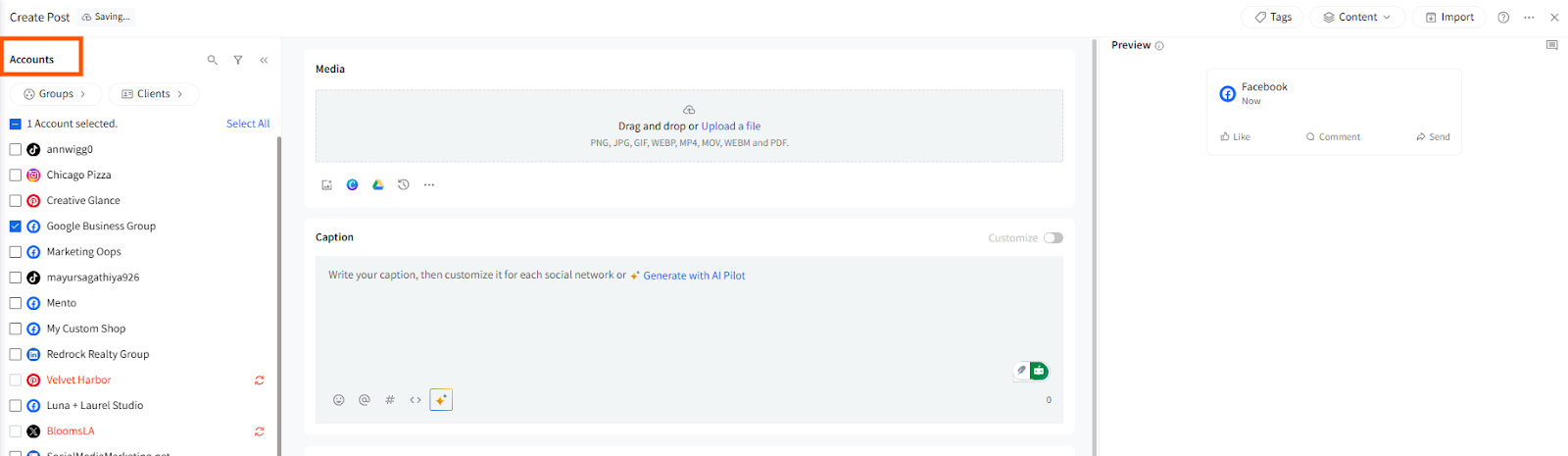
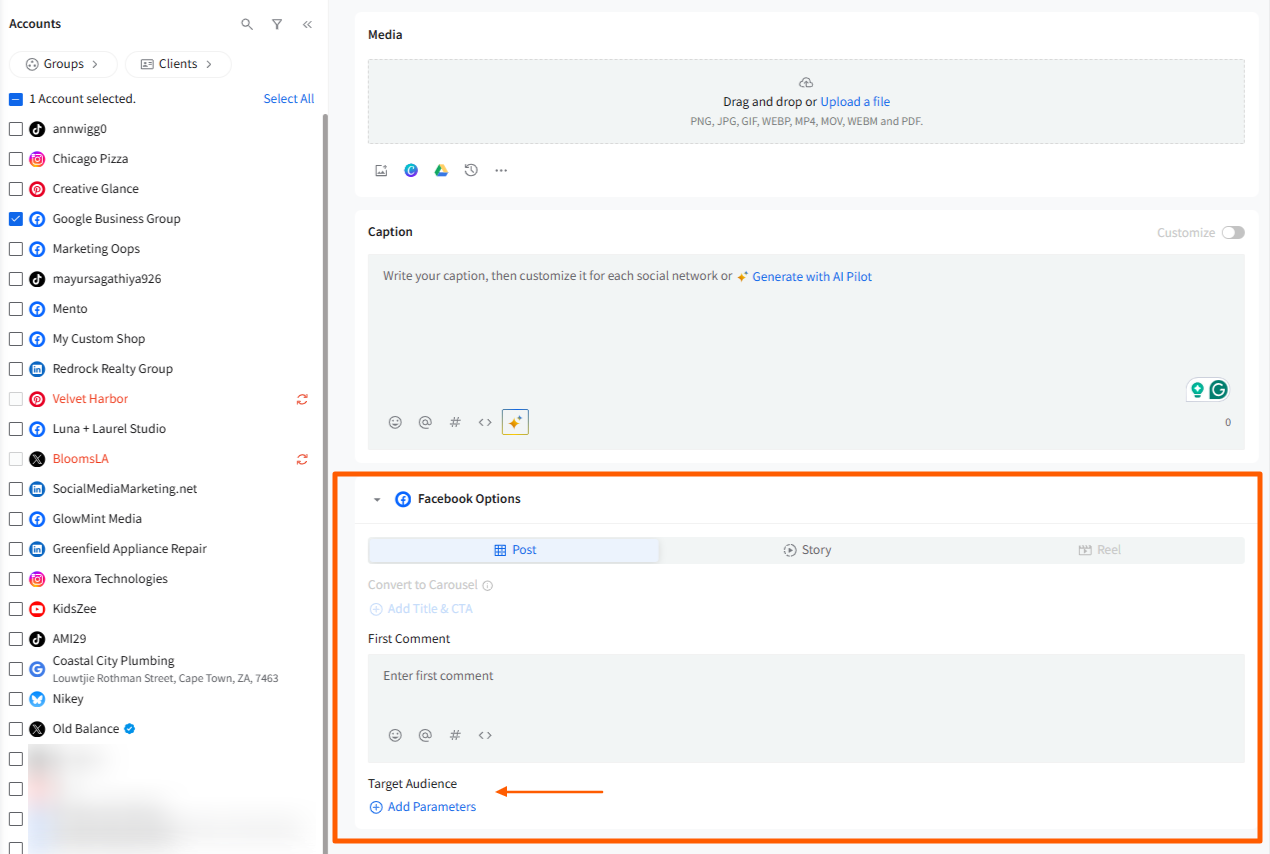
- Scroll down to see Facebook Options below the caption box.
- Locate the Target Audience option and click on Add Parameters.
You will now see two targeting modes:
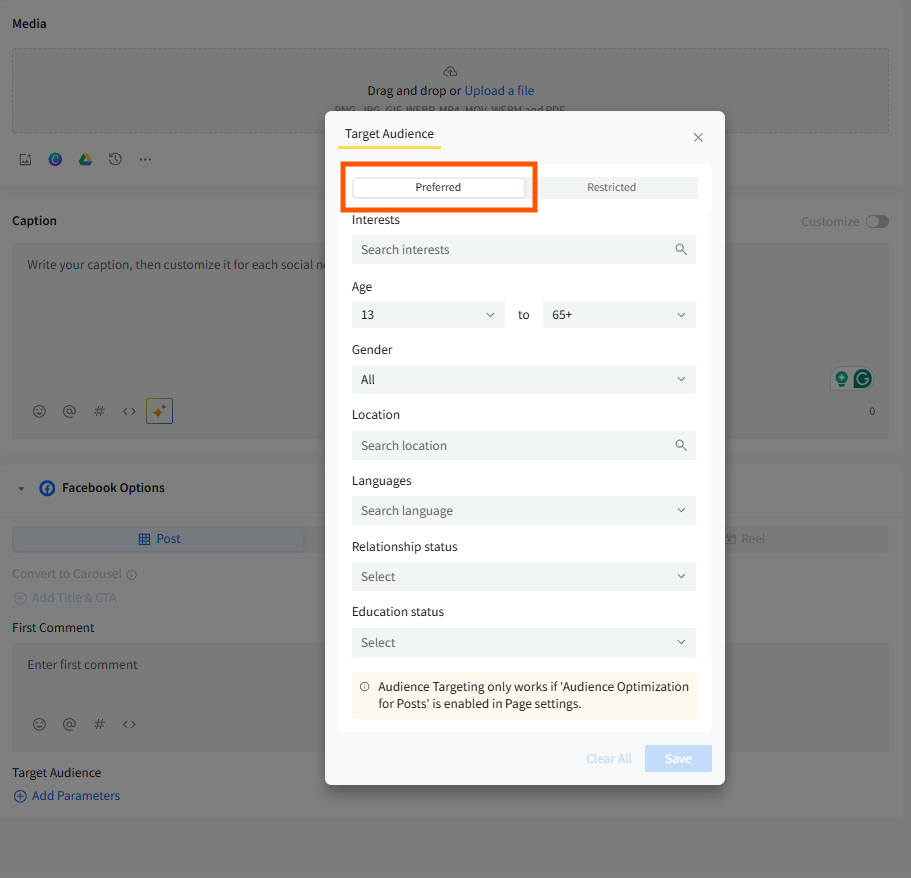
a) Preferred Audience: This option allows you to ensure your post appears only in the News Feed of a specific segment of your fans. It does not restrict the visibility of the post on your Facebook page for users outside the preferred audience.
- You can target the Preferred Audience by:
- Interests
- Age
- Gender
- Location
- Languages
- Relationship Status
- Education Status
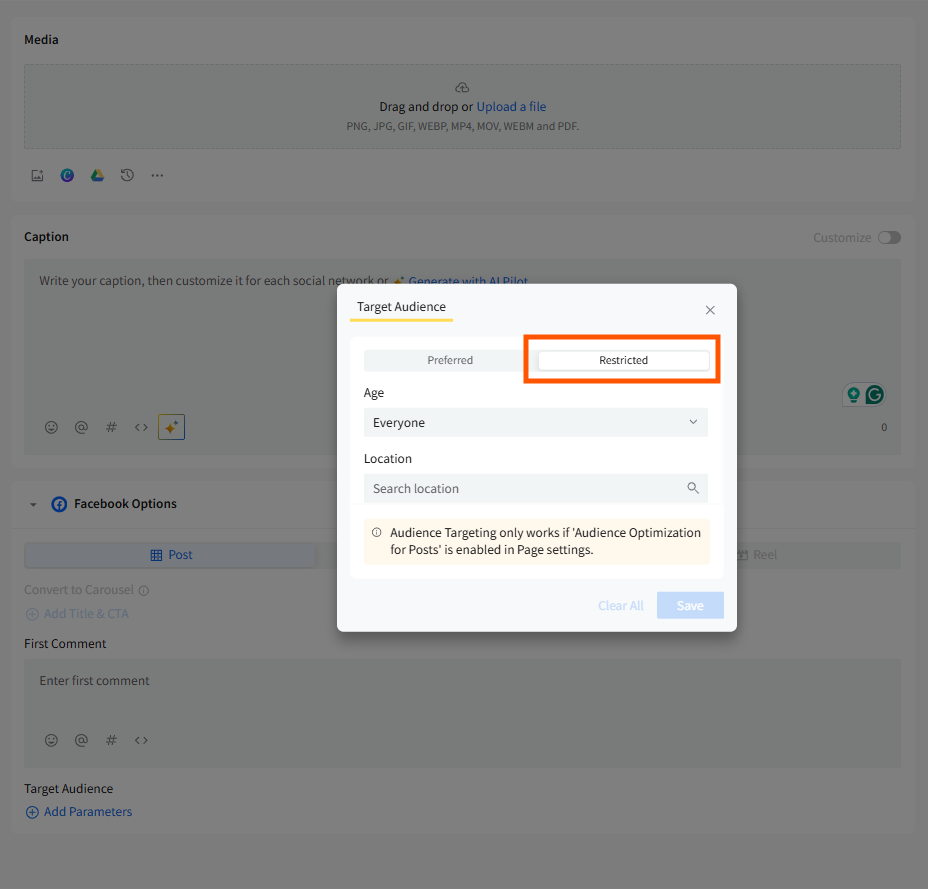
b) Restricted Audience: This option works as a companion to the Preferred Audience feature. It restricts a segment of people from seeing your posts in their News Feed. Unlike the Preferred Audience, the post won’t be visible to restricted users even if they visit your Facebook page.
- Restrict the audience based on:
- Age: Set an age limit below which the post will not be visible. Leave it as "everyone" if no age restriction is required.
- Location: Select the locations where you do not want the post to be visible.
By using Facebook Audience Targeting, you can ensure that your posts are seen by the right people, making your content more relevant and impactful.
📋 Note: Audience targeting is available only for Facebook pages.
LinkedIn Audience Targeting
LinkedIn audience targeting allows you to reach specific professional segments of your audience based on their job roles, industries, company sizes, and more. This feature is particularly valuable for B2B marketing, as it helps you tailor your posts to connect with the right professionals, ensuring that your content reaches the decision-makers and relevant stakeholders in your industry.
Let us see how to set up audience targeting for your LinkedIn posts using SocialPilot. Before you set up, note that the audience targeting on LinkedIn is limited to company pages.
- In the SocialPilot dashboard, click on the Create Post button.
- From the Accounts, Groups & Clients panel on the left, select the LinkedIn Company Page you want to publish to.
- Scroll down to see Facebook Options below the caption box.
- Locate the Target Audience option and click on Add Parameters.
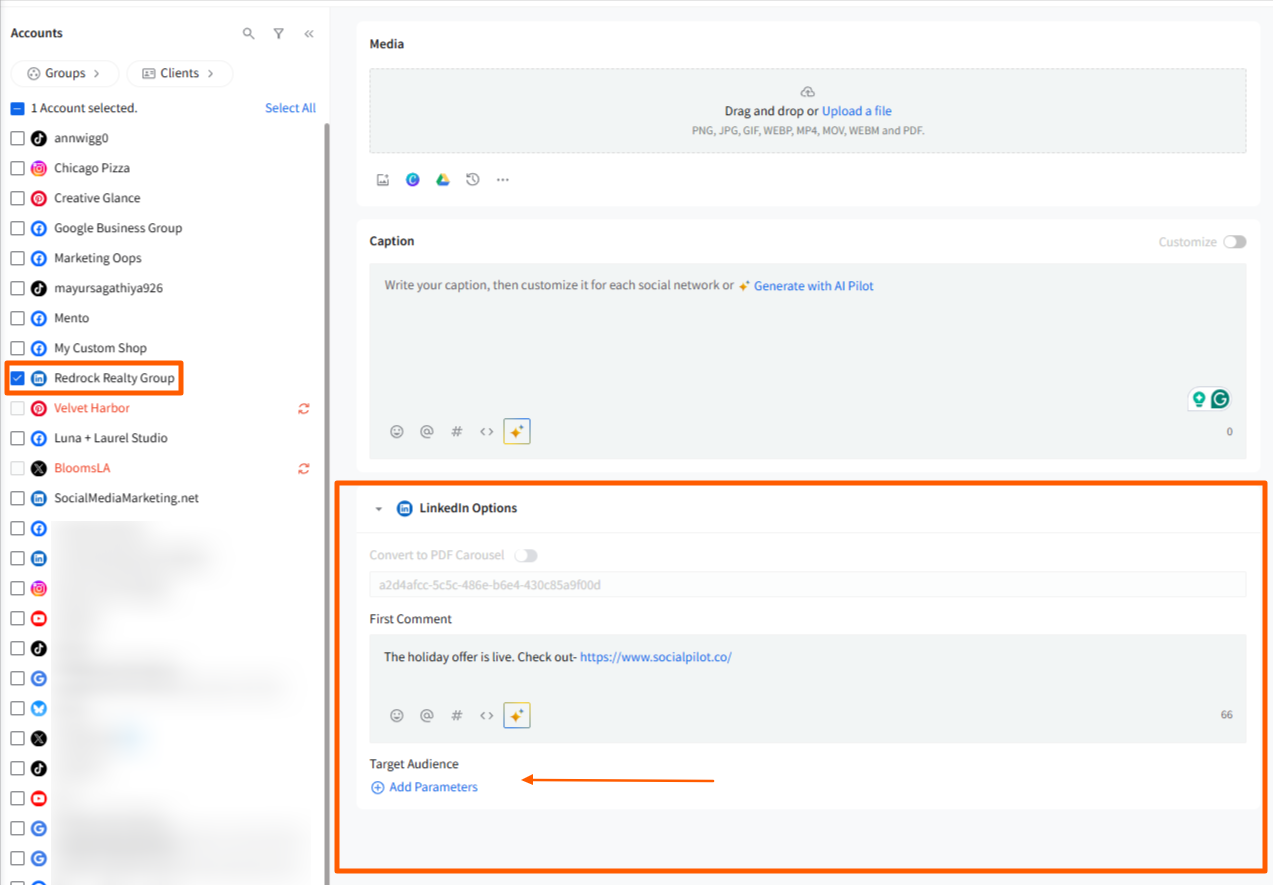
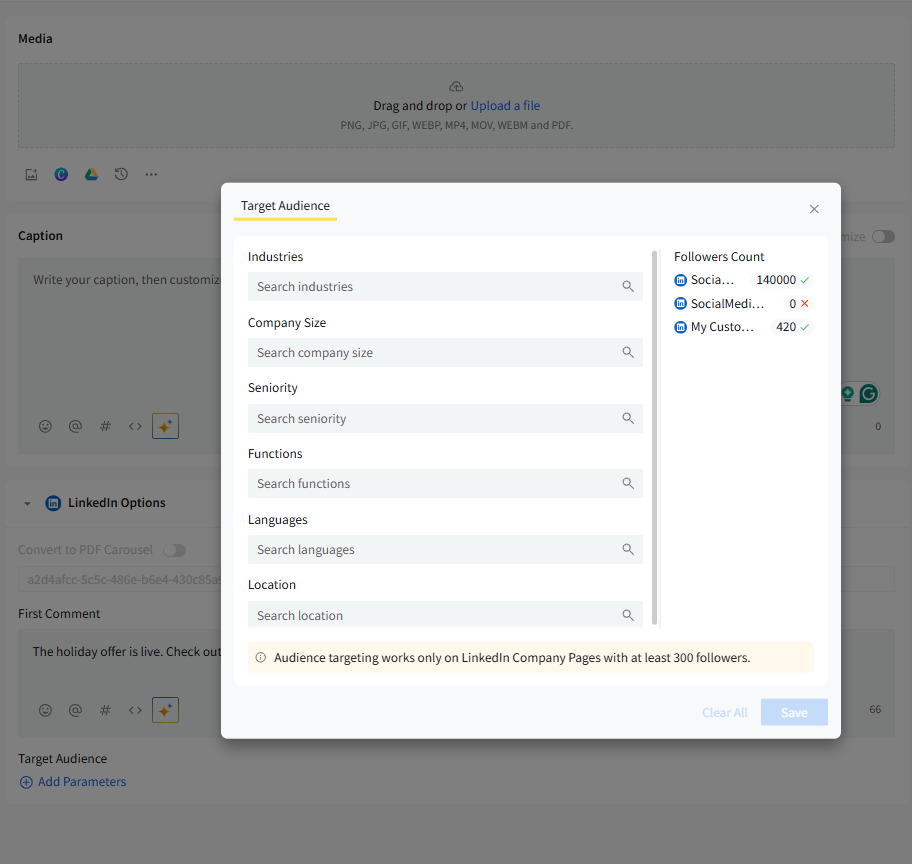
You can refine your audience by selecting:
- Industries
- Company Size
- Seniority
- Functions
- Languages
- Continents
- Countries
- Cities
On the right-hand side, you will see follower eligibility indicators for each connected LinkedIn Page:
- A green check mark means the Page meets the minimum requirement.
- A red cross means the Page does not meet the requirement.
LinkedIn Targeting Requirements
Audience targeting works only for LinkedIn Company Pages.
- Your Page must have at least 300 followers.
- Each chosen demographic also requires 300 reachable followers.
- If a demographic has fewer than 300 followers, it will appear as 0 due to LinkedIn’s API limitations.
Publishing Behaviour
- If the follower count drops below 300 after scheduling, your post will publish without targeting.
- If the follower count reaches 300 by the time of publishing, targeting will apply as selected.
Related Articles:
-
Can I Save Posts as Drafts on SocialPilot in the New Create Post Experience?
-
How to Create a Custom Post in the New Create Post Dashboard?
-
Using the Accounts, Groups & Clients Panel in the New Create Post
-
How to Use the First Comment Feature in the New Create Post?
-
How to Use Platform Options in the New Create Post Experience?
-
How to Tag People/Pages While Creating Posts in the New Create Post?
-
How to View Social Previews in the New Create Post Experience?