Introduction
With SocialPilot’s new Social Inbox Dashboard Card, you can stay on top of conversations without switching between multiple screens. The dashboard gives a quick view of all your unread messages across Inboxes, so engagement becomes a part of your daily workflow.
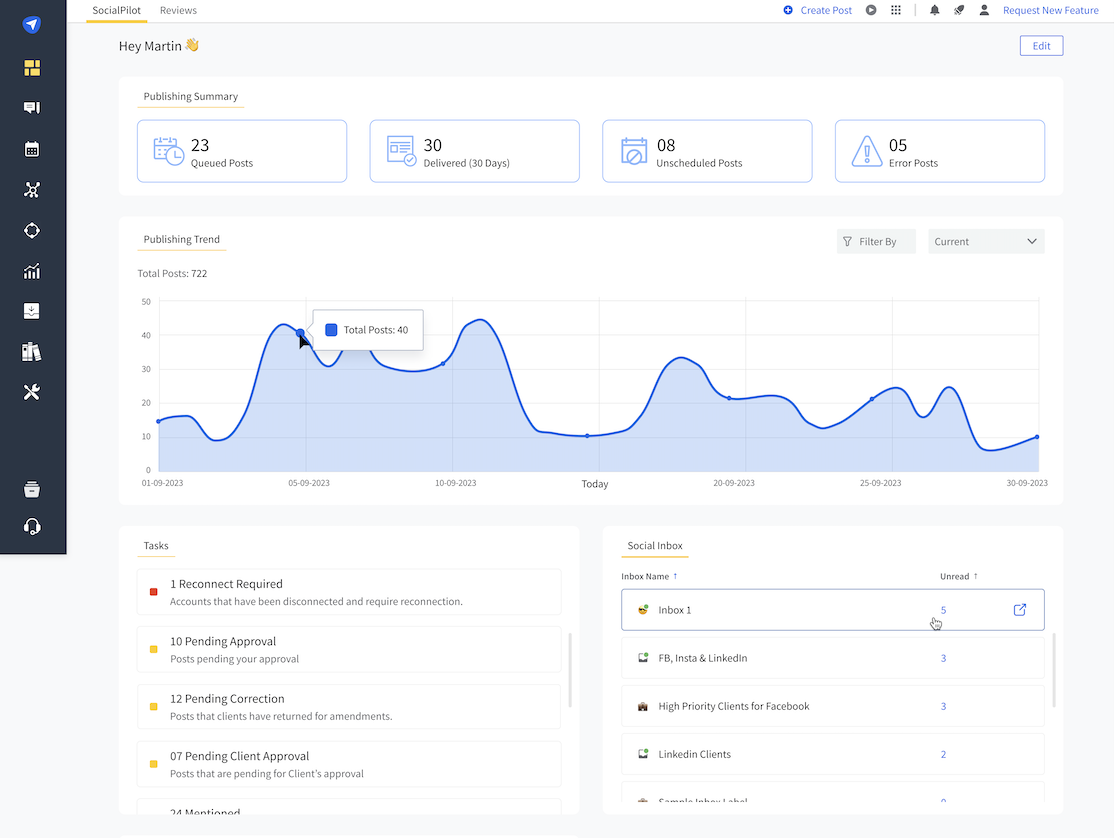
What Does the Dashboard Show?
- A list of up to 10 Inboxes with the unread message count for each one.
- A scroll option if you manage more than 10 Inboxes.
- The card updates automatically, so you always know what needs attention.
How Does it Work?
- As soon as you log in, you’ll see the Social Inbox on your dashboard.
- Each Inbox is displayed along with its unread message count.
- Clicking anywhere on the card will take you directly to that Inbox, with the Unread tab already open.
What Can You Do With the Social Inbox From the Dashboard?
- Get a ready-to-check count of unread messages in one place.
- Quickly jump into the right Inbox with a single click.
- Make responding to conversations part of your workflow, instead of switching between multiple screens.